DANiKAApp Store

Pillar 03 • Interactive Lookbook & OOTD

Outfit creator canvas & live-weather OOTD calendar

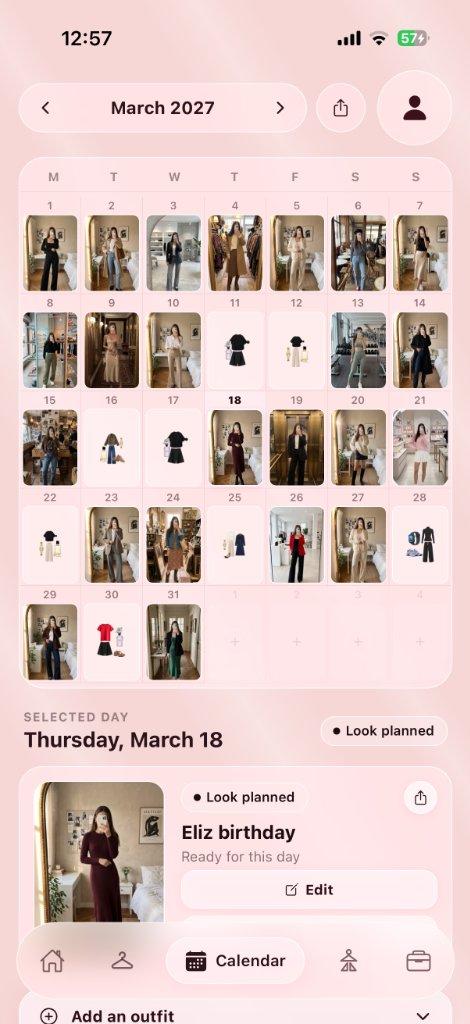
Danika combines a tactile Outfit Creator canvas—for layering, resizing, and saving private looks by occasion—with a day-by-day OOTD calendar supporting 1 or 2 outfits per day, worn-outfit photo logs, monthly recaps, and real-time local weather.

Layering canvas • 1–2 outfits/day • Live local weather

Real Danika OOTD calendar iPhone screenshot

Compose and save looks on an interactive canvas

Open the Outfit Creator to arrange cutout garments freely on a serene canvas. Layer knitwear over crisp shirting, resize outerwear, and pair bags, jewelry, and fragrances until the silhouette feels balanced.

Organize saved combinations by occasion—workday, dinner, weekend, travel—in your private lookbook and export clean visual collages whenever you wish to share a look.

  • Smooth layering, positioning, and resizing on iPhone.
  • Occasion-based lookbook folders & capsule wardrobe planning.
  • Visual look sharing straight from your private archive.

Plan 1 or 2 outfits per day with live local weather

Danika’s Outfit Calendar turns morning indecision into calm preparation. Schedule looks across your week in advance, with support for 1 or 2 outfits per day—ideal when office attire transitions into evening plans.

Live local weather integration (when approximate location is permitted) appears alongside each day, while worn-outfit photo logging and monthly recaps keep your closet analytics accurate.

  • Plan ahead day by day (1 or 2 outfits/day).
  • Log worn outfits with a quick photo and browse monthly recaps.
  • Real-time local weather built directly into the planner.

How users rely on the Outfit Calendar

Five-minute Sunday planning

Lock in Monday-to-Friday office looks matched to the week’s temperature forecast.

Capsule wardrobe refinement

Review your monthly recap to see which core pieces carry the most outfits.

Day-to-night scheduling

Assign both a daytime outfit and an evening look to the exact same calendar date.

Outfit Planner & Calendar FAQ

How do I create outfits in Danika?

Select garments from your digital wardrobe inside the Outfit Creator canvas, layer and resize each item, categorize the look by occasion, and save it to your private lookbook.

Can I schedule two outfits on the same day?

Yes. Danika supports planning 1 or 2 outfits per day, plus logging actually worn looks with a photo and viewing a monthly recap.

Does the OOTD calendar include weather forecasts?

Yes. With approximate location enabled, Danika displays live local weather so your scheduled looks and Chat Danika suggestions match real conditions.

Design tomorrow’s look tonight

Download Danika on the App Store to build your lookbook and weather-aware OOTD calendar.

Download on theApp Store